|
|
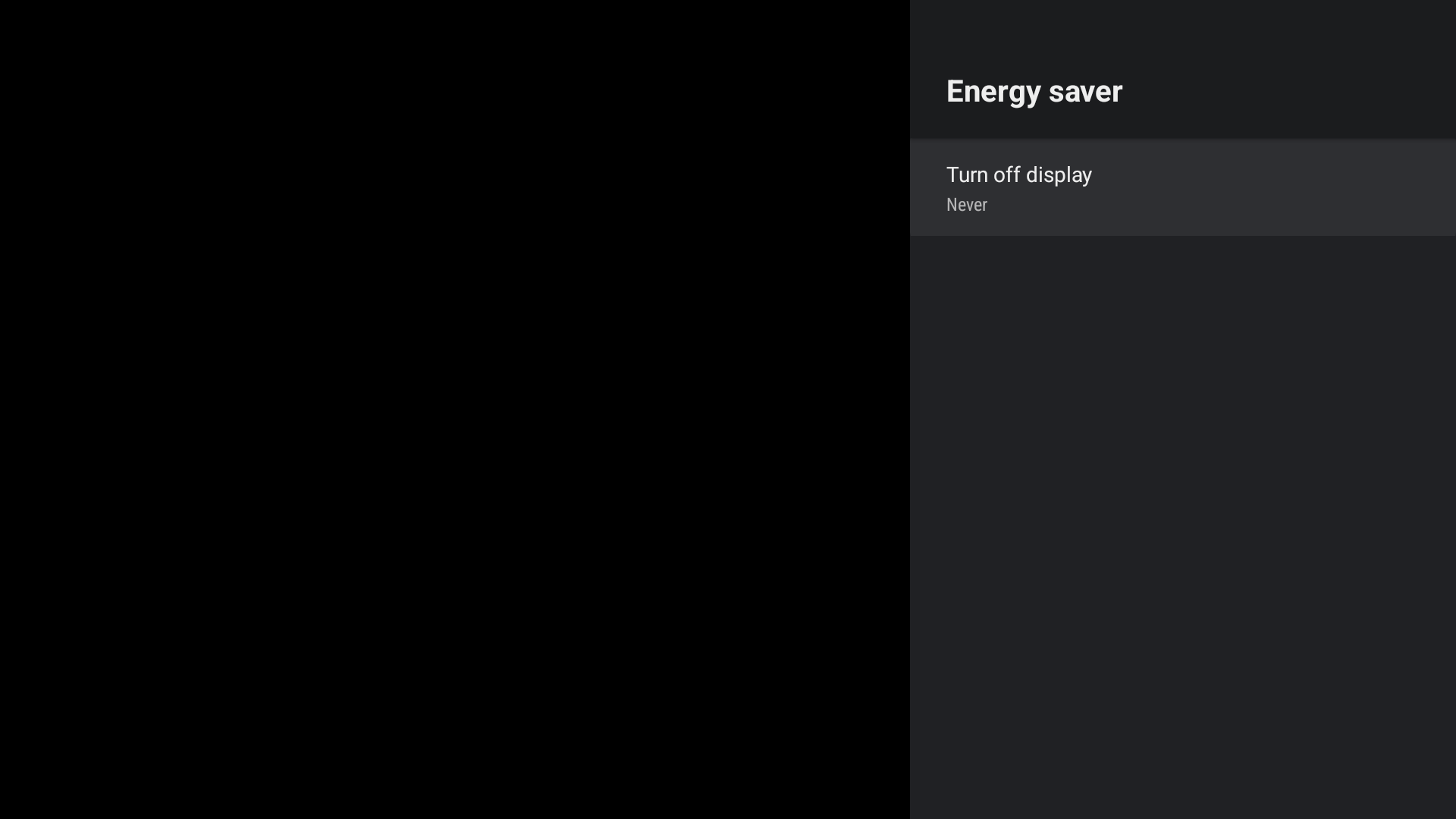
Energy-saver.png (22,210 bytes) |
|
|
Hi YK, 2. Automatically disable at boot time ==> If the user sets it to another option, it will be set to Never again after rebooting. This is a bug. Jerry |
|
|
Hi Jerry That's what SKB requested. There was a VoC report that there was an issue after a specific customer changed the value ( for exmaple 5min , 10min.. ) So SKB always wants to set it to Never after rebooting but it need to be checked if there is no problem with Google approval or Google policy Please check it Thanks YK.Jung |
|
|
Hi Jerry Please update the progress When can these three requests be completed? Smart3 ATV10(UI540) (?) Smart3 ATV12(UI537) (?) If you send me the test FW, I will check it here as well. Thank you YK.Jung |
|
|
Hi Jerry Please apply this function to BFX-UH200 as well. https://jira.skbroadband.com/browse/BPM-19375 https://jira.skbroadband.com/browse/BPM-19373 And please update the progress. Thank you YK.Jung |
|
|
Hi YK, upload test FW to /release_by_fxn/temp_wfh/jerry/eagle/mantis_1741/ATV12_SD/usb_bfx-at100_V15.537.53.zip Jerry |
|
|
Hi Jerry I checked your test fw 1. Set initial(default) value to disable => maybe ok , ( because of number 2 below, I am not sure ) 2. Automatically disable at boot time ==> ok and please check if there is no problem with Google approval or Google policy 3. block not to enter low-power mode via Google Energy-saver function ==> It has been confirmed that the low-power mode is not entered. But the LED is white that is , there is no hdmi output of STB. (TV display "no input signal" ) , this seems to be a problem. I think you need to change the LED status to red. Do you have any opinions on this? Thank you YK.Jung |
|
|
Hi YK, 3. block not to enter low-power mode via Google Energy-saver function ==> It has been confirmed that the low-power mode is not entered. But the LED is white that is , there is no hdmi output of STB. (TV display "no input signal" ) , this seems to be a problem. I think you need to change the LED status to red. Do you have any opinions on this? ==> 1. LED status to red ? 2. Need to enter standby mode ? If yes , i think i need to send a broadcast event to enter standby mode. Jerry |
|
|
Hi Jerry I think that I need to ask SKB for the action scenario. Let's implement it after receiving feedback from SKB Thank you YK.Jung |
|
|
Okey |
|
|
Hi Jerry (reminder) I need an answer to the contents below. 2. Automatically disable at boot time please check if there is no problem with Google approval or Google policy ( <=== reminder ) Please check it Thank you YK.Jung |
|
|
Hi YK, I discuss with Jason. it is mentioned in "Setting up screen saver and energy saver" test , so we need to setup energy saver to Never before this test. At the same time , there is no mention of rebooting. Jerry |
|
|
Hi Jerry 2. Automatically disable at boot time => About Google approval or Google policy It may become an issue if the test items are added in the future, but there is no problem now is it correct ? Thank you YK.Jung |
|
|
Hi YK, yes. Jerry |
|
|
Hi Jerry Please apply the following two functions to Smart3 UI540/UI537 and UHD4 UI536 1. Set initial(default) value to disable 2. Automatically disable at boot time The FW build(UI540) is scheduled today, so please apply it only 1,2 times first. and 3. block not to enter low-power mode via Google Energy-saver function The scenario is under discussion. https://jira.skbroadband.com/browse/BPM-19373 Thank you YK.Jung |
|
|
Hi YK, commit to Smart3 UI540/UI537 and UHD4 UI536 done Jerry |
|
|
Hi YK, upload to /release_by_fxn/temp_wfh/jerry/eagle/mantis_1741/ATV12_SD/20230629/usb_bfx-at100_V15.537.53.zip Jerry |
|
|
Hi Jerry 3. block not to enter low-power mode via Google Energy-saver function => Please apply this function even though it is in the following strange condition. ( Smart3 UI537/UI540 , UHD4 UI536 ) =============================================================== https://mantis.cnsbg.foxconn.com/vaas/view.php?id=1741#c13440 It has been confirmed that the low-power mode is not entered. But the LED is white that is , there is no hdmi output of STB. (TV display "no input signal" ) , this seems to be a problem. I think you need to change the LED status to red. Do you have any opinions on this? =========================================================== Thank you YK.Jung |
|
|
Hi Jerry About 3) block not to enter low-power mode via Google Energy-saver function Please let me know when the commit is done Thank you YK.Jung |
|
|
Hi YK, I am not sure what you need me to modify ? Is modified as follows: 1. block not to enter low-power mode 2. LED to Red. Jerry |
|
|
Hi Jerry Please apply only this part now 1. block not to enter low-power mode As far as I know, it is a code that has been implemented before. Thank you YK.Jung |
|
|
Hi YK, Yes. 1. block not to enter low-power mode This item is ok. Jerry |
|
|
Hi Jerry UI540 is currently in a critical situation. If you use UI540 now, you can enter passive mode(low-power) in two ways. 1) Enter low-power mode through the setting of SKB HomeUI 2) Enter low-power mode through Google Power-Saver There is an issue after entering low-power mode through Google settings. https://jira.skbroadband.com/browse/BPM-20164 Therefore, SKB is only asking to prevent entering low-power through Google settings. If there's anything you don't understand, please contact me. Thank you YK.Jung |
|
|
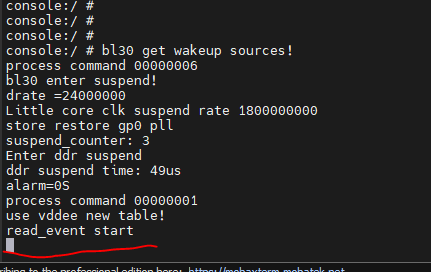
Hi Jerry During the test, there are occasional issues that do not wake up after entering the low-power mode. The test method is as follows. Set low power mode to 5 minutes at Menu (attached picture) 1) Press Power button ("B tv 전원") STB go to Sleep 2) wait 5 minutes STB go to low-power mode 3) Press Power button ("B tv 전원") STB should wake up normally. But when I test it, sometimes there are issues that don't wake up (random) It is assumed that the current test results are occurring only in STB and RCU (BT mode). Issue not yet occurred in IR mode (Our QA team is continuing to test.) When the issue occurs, the following Serial console log is observed when entering the low-power mode. read_event start (attached picture) Currently, UI540 has added a menu for low-power mode, so this function should operate stably Please check it Thank you YK.Jung 0f50f209e8079b7ee3d476789e3be25.png (10,756 bytes) image.png (82,355 bytes) |
|
|
Hi Jerry - This issue is also occurring in v15.540.8 version - It is also happening in the Test FW you sent me yesterday. /release_by_fxn/temp_wfh/jerry/eagle/mantis_1741/ATV10_SD/usb_bfx-at100_V15.540.10.zip And In this test FW, it was confirmed that SKB's request was applied. Please commit this patch to UI540 when you are ready Now, there is an issue in basic function, and this issue must be resolved. Thank you YK.Jung |
|
|
Hi Jerry I close this ticket because this issue is no longer observed at UI542 Thank you YK.Jung |
- yk.jung ( (ALTech) Younkwang Jung ) developer
.png)
